Custom tracking links are created using URL parameters. These parameters are added to an actual page url to send information to the page. These URLs can be used to create QR Codes.
These parameters can be whatever you like, they do not affect how the page is rendered or functions. They just add information to the form.
To make a Form Tracking url, you will need to know the source, the medium, and the campaign.
- The source is where the user will click the link. Ex. “qrcode”, “facebook”, “instagram”, “email”, etc…
- The medium is the avenue in which the user found the link. Ex. “adverts”, “ads”, “social”, “promos”, “flyer”, “handout”, “flyer241019”, “flyerconcourse”, “flyerentrydoor”, etc… basically where the user will scan the code from.
- The campaign is the purpose of the link. Ex. “pre-season-tix”, “end-of-season”, “summer”, “april-special”, a date such as “26-03-26”, etc…
Use the source, the medium, and the campaign as url parameter values to build a URL. See below for examples.
Build Link URL #
[url]?utm_source=[x]&utm_medium=[y]&utm_campaign=[z][url]=https://maconmayhem.com/[path-to-page]/
[x], source =”qrcode”, “facebook”, “instagram”, “email”, etc…
[y], medium = “adverts”, “ads”, “social”, “promos”, “flyer”, “handout”, “flyer241019”, “flyerconcourse”, “flyerentrydoor”
[z], campaign=Ex. “pre-season-tix”, “end-of-season”, “summer”, “april-special”, a date such as “26-03-26”, etc…
Note:
- URL parameters must be a string of characters without spaces.
- URL must include “?” after url and “&” between parameters
- You may use “-” in place of a space.
- Do not use any other special characters.
- The format must be exactly as below.
- Additional URL parameters may be added without affecting the tracking parameters.
Example URLs #
https://marksmenhockey.com/tickets/season/?utm_source=email&utm_medium=promo&utm_campaign=may26https://maconmayhem.com/community/school-day-game/?utm_source=qrcode&utm_medium=videoboard&utm_campaign=octoberhttps://marksmenhockey.com/community/mini-marksmen/?utm_source=qrcode&utm_medium=flyer&utm_campaign=concourseEmail Submissions #
The parameters that are in the url are passed through the form, when it is submitted, to the email that you receive.
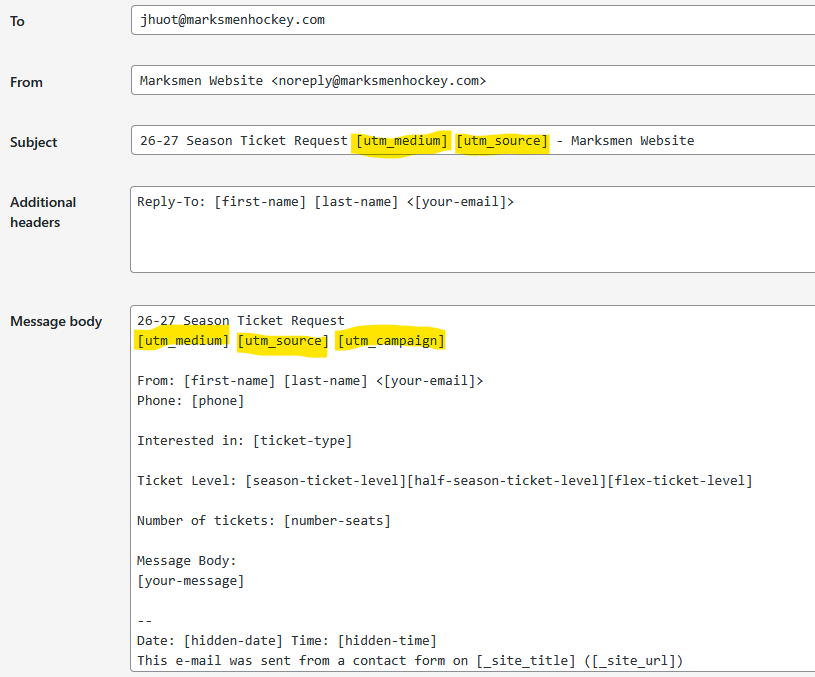
For example, the Season Tickets email that you receive is derived from the following template. The Subject line has the medium and source. The 2nd line of the email body has the medium, source, and campaign.
When you download the CSV from the website, you can filter/sort the column for each of these parameters.